Posted by Rohit Kumar
Filed in Technology 8 views
Hey there! If you’re building or maintaining any kind of modern app or website, you’ve probably heard the phrase Performance Testing thrown around. But what does it actually mean in practice? And why are there so many different types?
I’ve been in enough projects where we launched something that looked perfect in testing, only to watch it struggle when real users showed up. That’s why understanding the different types of Performance Testing has become one of the most useful skills in my toolkit. In this guide, I’ll break down Load Testing, Stress Testing, Spike Testing, and Endurance Testing in plain English — with real stories, practical tips, and no overwhelming jargon.
Whether you’re a developer, tester, product manager, or just someone curious about how reliable software gets built, you’ll walk away knowing when and how to use each type.
Here’s the thing: your app doesn’t live in a perfect, controlled environment. Real life is messy. Traffic comes in waves, users behave unpredictably, and systems get tired after running for hours. One test type can’t possibly cover everything.
That’s where Performance Testing shines. It’s not just about checking if something “works.” It’s about understanding how your application behaves when life gets real. Let’s dive into the four most important types.
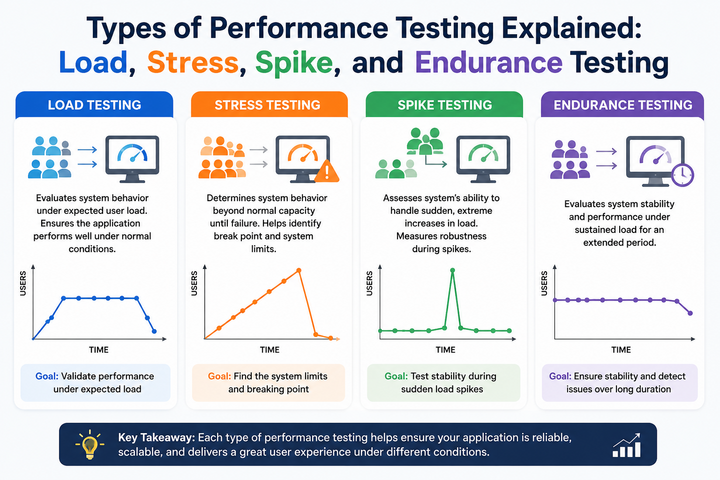
Load Testing is probably the one you’ll use most often. It simulates the number of users or transactions you realistically expect on a normal day — or during a busy period you’ve planned for.
Think of it like rehearsing a restaurant for Friday night dinner rush. You want to know if the kitchen and servers can handle the expected crowd without everything slowing to a crawl.
How it works in practice: You gradually increase the number of virtual users until you reach your target load. Then you measure how the system responds — page load times, error rates, server CPU usage, etc.
A real example I’ve seen: An e-commerce client was preparing for their biggest sale of the year. They expected around 7,000 shoppers at peak. During Load Testing we discovered that the checkout page became painfully slow after 4,500 users because of some unoptimized database queries. We fixed it before launch, and the sale went smoothly. Without that test, they would have lost a lot of money and trust.
Key things to watch:
Popular tools: Apache JMeter (free and powerful), k6 (great if you like writing scripts), Gatling, and cloud options like BlazeMeter.
Load Testing gives you confidence that your app can handle normal business without breaking a sweat.
This is the “what if everything goes wrong” test. Stress Testing deliberately overloads the system way beyond normal levels to find its breaking point and see how it recovers.
It’s a bit like seeing how much weight a bridge can hold before it cracks — and whether it collapses dangerously or bends gracefully.
Real-world story: A banking app I worked with ran Stress Testing simulating five times their expected traffic during payday. At around three times the load, their authentication service started failing hard. The good news? We caught it early. They added better rate limiting and auto-scaling, so when real high traffic hit, the system slowed down gracefully instead of crashing completely.
What you learn from Stress Testing:
Stress Testing is especially important for mission-critical systems where downtime isn’t acceptable. It helps you build resilience, not just speed.
Spike Testing checks what happens when traffic explodes suddenly and then drops back down. Think flash sales, viral news, or when a big influencer mentions your product.
Social media has made this type of Performance Testing way more important than it used to be. Traffic can 10x in minutes.
Example from the wild: A news website got caught off guard when a major story broke. Without Spike Testing, their servers couldn’t handle the sudden jump and the site went down for nearly an hour. After adding proper caching and auto-scaling (and testing it!), later spikes were handled smoothly — response times stayed acceptable even when traffic jumped dramatically.
What to measure:
Tools like k6 and Gatling are particularly good for scripting these sharp ramps. Cloud providers also have built-in ways to simulate spikes.
If your product can go viral or runs promotions, Spike Testing should be on your checklist.
Endurance Testing runs your application under a steady load for a long time — hours or even days. It’s designed to catch problems that only show up after the system has been running for a while.
Memory leaks, slow database connections, and gradual performance degradation are classic issues this test reveals.
True story: A collaboration tool looked great in shorter tests. But when we ran Endurance Testing for 48 hours straight, we found a small memory leak in the notification service that eventually slowed everything down. Fixing it made the product much more stable for enterprise customers who kept it open all day.
Focus areas:
This type is crucial for applications people use continuously — dashboards, monitoring tools, streaming services, etc.
Here’s a quick way to see how they differ:
Using all four gives you a much fuller picture than relying on just one.
You don’t need a huge budget to start. Some of my favorites:
Many teams now run these tests automatically in their deployment pipelines, which is a game-changer.
If your team is stretched thin, bringing in Performance Testing specialists for a few key projects can save a lot of headaches.
In 2026, users are less forgiving than ever. A slow or unreliable app gets abandoned fast. Good Performance Testing helps you deliver experiences people actually enjoy using.
It also saves money. Fixing issues early is way cheaper than emergency fixes after launch. Plus, you avoid those embarrassing public outages that hurt your reputation.
Load, Stress, Spike, and Endurance Testing each play their own important role in Performance Testing. Together, they help you build applications that are not just feature-rich, but genuinely reliable when it counts.
You don’t have to implement everything perfectly on day one. Start with Load Testing on your most important user flows. Once you see the insights it gives you, you’ll naturally want to expand to the other types.
The best products I’ve worked on weren’t the ones with the most features — they were the ones that stayed fast and stable even when things got busy. That reliability comes from disciplined Performance Testing.
So go ahead — pick one critical part of your app and run your first test this week. You might be surprised (and a little relieved) by what you discover.