Posted by Work DesQ
Filed in Technology 17 views
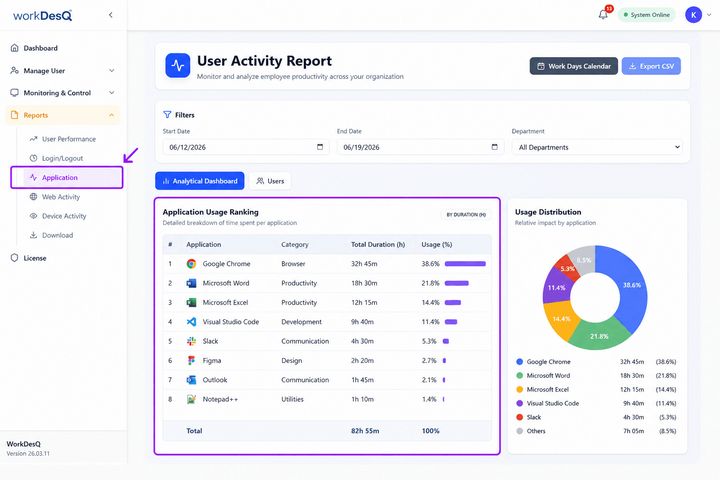
For modern organizations running remote or hybrid operations, physical presence is no longer the metric for success. Instead, data provides the operational baseline. Managers frequently struggle with a core question: How are work hours actually being spent across our digital toolkit?
When project baselines rely on manual time logs, project planning suffers from inaccuracies. This guide breaks down how implementing clear, ethical employee application usage monitoring solves this visibility challenge, eliminates operational bottlenecks, and respects team privacy.
At its core, employee application usage monitoring is the practice of utilizing background software to automatically record the specific desktop applications, cloud tools, and web URLs a worker interacts with during paid hours.
Unlike older, invasive tracking systems, modern workplace visibility systems serve as a form of operational intelligence. The goal is not continuous micromanagement; it is about building an objective record of daily workflows.
This software maps out the work footprint without requiring manual intervention from the team. By capturing active windows, mouse activity, and keyboard inputs, it generates clear reports that show exactly where time goes.
Relying entirely on self-reported spreadsheets or manual timers often results in inaccurate data. Human error, forgetfulness, and minor biases make manual logs unreliable.
Implementing a systematic approach to employee application usage monitoring provides several distinct operational advantages:
When a team estimates that a software design or client proposal takes five hours, but it actually takes fifteen due to unexpected tool complexities, future billing rates suffer. Automatic monitoring tracks the real time-on-task data across design platforms, text editors, and communication channels. This allows project leads to build accurate baselines for forecasting, sprint planning, and client invoices.
Most enterprises pay for multiple redundant applications. A business might pay for Slack, Microsoft Teams, and Zoom simultaneously. By reviewing aggregate application data, leadership can quickly see which tools are actively adopted and which licenses sit idle, saving significant software budget every quarter.
A sudden spike in working hours or continuous app activity late into the night signals a team member under immense pressure. By reviewing workflow trends, managers can identify workload bottlenecks early, redistribute tasks, and support employee retention before exhaustion leads to turnover.
Choosing the right software setup depends entirely on your industry and team structure. However, any high-quality workspace analytics tool should contain these baseline capabilities:
|
Feature |
What It Tracks |
Operational Benefit |
|
Real-Time Activity Categorization |
Automatically tags apps as "Core Work" or "Distraction". |
Minimizes manual data sorting for managers. |
|
Idle Time Detection |
Identifies periods of keyboard and mouse inactivity. |
Isolates the true cost of operational delays. |
|
Contextual Screen Capture |
Takes occasional, customizable desktop screenshots. |
Serves as an auditable record for client billing. |
|
Unified Dashboard Access |
Displays metrics to both the manager and the employee. |
Encourages self-correction and transparent communication. |
The biggest roadblock to adopting an employee application usage monitoring strategy is the natural fear of workplace surveillance. According to digital workplace surveys, poor employee adoption and team resentment are the leading reasons organizations abandon monitoring tools within the first twelve months.
To build an ethical framework, focus on these strict compliance and trust practices:
Radical Transparency
Avoid silent or hidden monitoring software. Hidden trackers harm workplace trust and heavily increase turnover intentions once employees discover them. Always deploy visible agents that live in the system tray, letting workers see when they are logging hours.
Clear Boundary Controls
Employees must have the ability to pause tracking with a single click. When a team member takes a lunch break or handles a quick personal matter on a personal device, the software should remain entirely inactive.
Strict Data Minimization
Only collect what is absolutely necessary to verify the job. If your core goal is simply assessing software usage patterns, block the capture of private messaging content, financial fields, or keystroke logs. If your operations fall under GDPR or CCPA frameworks, consult your legal team to ensure your data retention rules fit regional compliance boundaries.
Successfully introducing employee application usage monitoring requires a structured roll-out strategy.
1.Define Clear Measurement Goals
Document exactly why you are introducing tracking. Are you looking to improve client billing accuracy, optimize software licenses, or support remote team accountability? Share these goals openly with your staff.
2.Establish Productivity Benchmarks
Define which applications qualify as productive for specific roles. For example, GitHub is core work for a developer but a distraction for an accountant. Input these rules into your system's categorization engine.
3.Launch a Focused Pilot Program
Test the platform with a single department or a small group of volunteers. Use this period to refine idle time rules, adjust screenshot frequencies, and gather direct user feedback on the software's performance.
4.Review Dashboards Together
Instead of using data as a disciplinary stick, integrate the insights into regular, constructive feedback loops. Allow team members to review their own analytics dashboards to help them manage focus time independently.
Ultimately, tracking employee application usage monitoring data is a tool for optimization, not cross-examination. The goal is to give distributed teams the resources, focus blocks, and clear structures they need to perform at their best. By choosing transparent tools and connecting the data directly to workflow improvement, you create a balanced, high-performing workspace rooted in clear documentation and mutual respect.
